I purchased Submerge from the Mac App Store but it’s crashing when I launch it. What’s up?
Submerge is using QuickTime for video decoding/encoding. Some old QuickTime components aren’t compatible with the new sandboxing rules that Apple forces us developers to use these days. Our fellow friends at Boinx software has developed a little utility app that will help you find and clean out those incompatible components. Download SandboxCleaner here and look for “Components That May Cause Problems”.
Exporting with hard-coded subtitles is so sloooow. How do I make it faster?
Update to Submerge 2.1. We added FFMPEG encoding for super-fast exports.
When I export a movie I sometimes get a “Permission denied” error, why?
Submerge 2.0 purchased from the Mac App Store is missing a sandbox entitlement for your Movies folder. Export to your Downloads folder until Submerge 2.0.1 is available in the Mac App Store.
How can I add subtitles to a movie purchased or rented in the iTunes Store?
The short answer is, you can't. Apple has protected their movies with a DRM system called FairPlay. As a third party developer you have no access to those frameworks.
How do I work with MKV, AVI and DivX movies?
Download and install Perian.
When I try to open any movie Submerge crashes? I’m running 10.7 Lion!
It seems like the 3ivx QuickTime component isn’t working with 10.7 Lion. Please remove all 3ivx files from your home/Library/QuickTime and /Library/QuickTime folder and relaunch Submerge.
Please consider removing other obsolete QuickTime Components: FFusion, Xvid Delegate, 3ivX, DivX, DivX Decoder, XviD, msmpeg4v1, msmpeg4v2, AviImporter, EX_M4S2, Casio AVI Importer, AC3 Codec, and MatroskaQT.
How do I burn a subtitled DVD from my Submerged movie?
Export the movie as using the Apple TV or iPod preset (don’t use the Flatten preset cause it doesn’t hardcode the subtitles into the video track). Launch iDVD and create a project and choose File->Import->Video... Now you can burn your subtitled movie to a DVD. It would probably work like this in most other DVD authoring apps as well.
I can see video but I can't hear any sound?
Download and install Perian. Also check this post.
The subtitles are located below the bottom edge when I watch a subtitled movie on my television. How can I adjust the vertical location of the subs?
Just go to Preferences->Subtitles and adjust Extra Vertical Offset to nudge your subtitles upwards on the screen. This is a common problem on over-scanned devices like an ordinary TV.

The subtitles are very small. How can I make them larger?
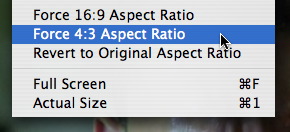
Submerge has 4 subtitle sizes to choose from, small, medium, large and xtra large. The actual size is calculated based on the height of the movie. In medium size for example, the font size is 5 percent of the movie height. You can also make the subtitles bigger by adopting the movie aspect ratio to the display you're going to show the movie on. The new ipod nano for example has a screen resolution of 320x240 pixels, which is an aspect ratio of 4:3. To better use that screen real estate you can force the aspect ratio to 4:3 before rendering the subtitles.
After upgrading to OS X 10.8 Mountain Lion I don’t have any sound on some .avi and .mkv files? Why?
The problem is related to Perian and AC3 audio. It seems like there’s a problem with the A52Codec.component that is part of Perian. Fortunately there’s an easy fix.
First install the latest version of Perian.
Download and unzip this A52Codec.component. Put in in your home/Library/Audio/Plug-ins/Components/ folder replacing the old one.
In Mountain Lion you go to your Library folder by holding down the alt-key on your keyboard and select Go->Library on the main menu.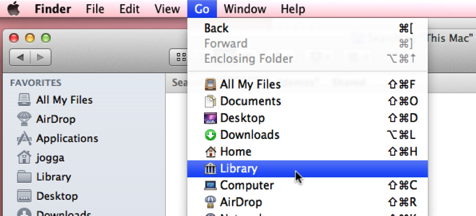
Or select the “Go” menu and “Go to folder…” and copy and paste the following line and hit Go.
~/Library/Audio/Plug-ins/Components/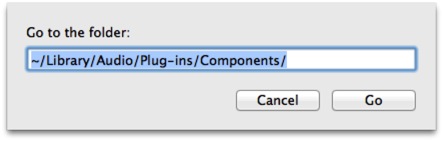
How do I make one movie out of two?
Sometimes you'll find that a movie is split into two files. You can easily merge the two files into one like this:
1, Open movie 1 and render subtitle file 1.
2, Open movie 2 and render subtitle file 2.
3, With movie 2 active select ⌘-A (Select all) from the keyboard or select Select all from the Edit menu.
4, Copy movie 2 by hitting ⌘-C from the keyboard or select Copy from the Edit menu.
5, Activate the window for movie 1 by clicking on it.
6, Select Go to end from the Movie menu.
7, Paste movie 2 to the end of movie 1 by hitting ⌘-V on the keyboard or select Past from the Edit menu.
8, Done! You now have one movie instead of two :-)