About Presets
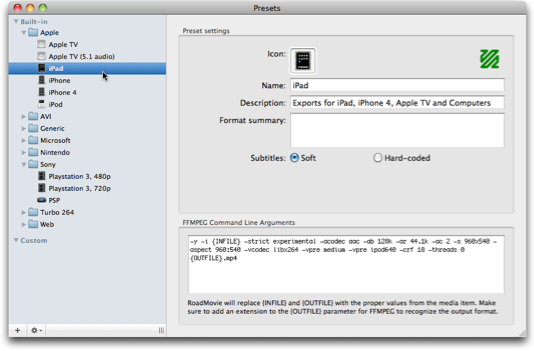
In the Presets window you manage all your encoding settings.

Encoding engines
RoadMovie uses FFMPEG (built-in) or QuickTime to encode your movies. You can quickly see which one is used for a particular preset by looking at the icon in the upper right corner.
 Preset is using FFMPEG
 Preset is using QuickTIme
Subtitles
You can choose if your preset will use Soft subtitles or Hard-coded subtitles. Soft subtitles will be the perfect choice for any Apple device like the iPad, iPhone, iPod or Apple TV. Hard-coded subtitles will “burn” into the video track and will play on any device like a PS3 or Nintendo Wii for example.
Create your own Presets
It’s easy to tweak existing Presets for your special needs. Just duplicate one of the built-in ones and start changing the paramers/settings.


This is the iPad FFMEG settings for example
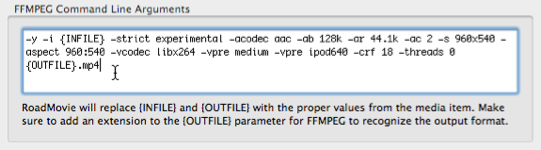
You can learn more about the FFMPEG command line arguments by visiting the FFMPEG documentation page.