Home
Mac Apps
RoadMovie
iSubtitle
Quick Start Movie
Screenshots
Reviews
About Subtitles
About Languages
About Chapters
About Metadata
About Exporting
On iPod Classic/Nano
On iPhone/iPod Touch
On iPad
On Apple TV
In iTunes
In QuickTime Player
Version History
How to Localize
Buy
Submerge
iPhone and iPad Apps
Freebies
Support
Blog
Contact
Home
/
Mac Apps
/
iSubtitle
/
In QuickTime Player
/
Home
Mac Apps
RoadMovie
iSubtitle
Quick Start Movie
Screenshots
Reviews
About Subtitles
About Languages
About Chapters
About Metadata
About Exporting
On iPod Classic/Nano
On iPhone/iPod Touch
On iPad
On Apple TV
In iTunes
In QuickTime Player
Version History
How to Localize
Buy
Submerge
iPhone and iPad Apps
Freebies
Support
Blog
Contact
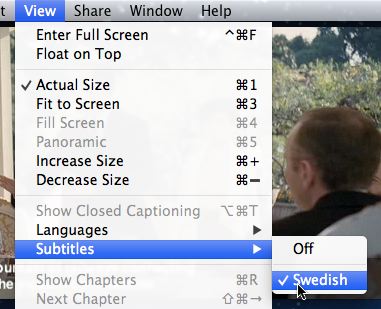
When watching a subtitled movie in QuickTime Player you can use the View menu to select your desired language.